
- Home
- :
- Product Forums
- :
- Concur Expense Forum
- :
- Re: Tokens for Email Reminders
This content from the SAP Concur Community was machine translated for your convenience. SAP does not provide any guarantee regarding the correctness or completeness of this machine translated text. View original text custom.banner_survey_translated_text

- Mute
- Subscribe
- Bookmark
- Report Inappropriate Content
Tokens for Email Reminders
I'm working on setting up email reminders for unsubmitted card transactions specific for my company, and I get a little popup saying to "use these tokens as placeholders for the specific values" (see screenshot). I've also seen another rule with a %4% token.

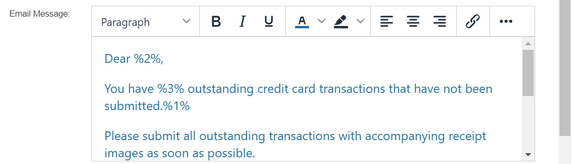
My question is -- where do I find a list of what each of these tokens refer to?
I know %2% is tied to User Name and %3% is tied to Number of Records, but what are all the others? What is %1% tied to? Are these assigned by the company admin (me) or are they assigned by Concur?
This content from the SAP Concur Community was machine translated for your convenience. SAP does not provide any guarantee regarding the correctness or completeness of this machine translated text. View original text custom.banner_survey_translated_text
- Mute
- Subscribe
- Bookmark
- Report Inappropriate Content
Following up -- I actually figured it out. There's an online guide I discovered. I should probably check there before I post discussions here.
But if anyone needs to know:
%1% is Logon URL
%2% is User Name
%3% is Number of Records
%4% is List of Records
%5% is Approver Name
Hope this helps!
This content from the SAP Concur Community was machine translated for your convenience. SAP does not provide any guarantee regarding the correctness or completeness of this machine translated text. View original text custom.banner_survey_translated_text


- Mute
- Subscribe
- Bookmark
- Report Inappropriate Content
@swalden I was just about to post the link to the Email Reminder Setup Guide.
Thank you,
Kevin
SAP Concur Community Manager
Did this response answer your question? Be sure to select “Accept as Solution” so your fellow community members can be helped by it as well.

This content from the SAP Concur Community was machine translated for your convenience. SAP does not provide any guarantee regarding the correctness or completeness of this machine translated text. View original text custom.banner_survey_translated_text

- Mute
- Subscribe
- Bookmark
- Report Inappropriate Content
I've suggested this before, but I would LOVE for the user's preferred name to be associated with %2% and likewise for %5% to match the Approver's preferred name. Any tips on where else I can make this suggestion would be greatly appreciated!
This content from the SAP Concur Community was machine translated for your convenience. SAP does not provide any guarantee regarding the correctness or completeness of this machine translated text. View original text custom.banner_survey_translated_text
- Mute
- Subscribe
- Bookmark
- Report Inappropriate Content
An email that connects with the recipient is going to be more effective. I don't need to use someone's first and last government name, i need just the name they go by. For example, I want to address an email to John, not "Johnathon Smith"
This content from the SAP Concur Community was machine translated for your convenience. SAP does not provide any guarantee regarding the correctness or completeness of this machine translated text. View original text custom.banner_survey_translated_text
- Mute
- Subscribe
- Bookmark
- Report Inappropriate Content
Another thing i would like is a field that i can select whether i want to copy the email to delegates, there is a "copy to approver" option, but delegates should see these messages too.

This content from the SAP Concur Community was machine translated for your convenience. SAP does not provide any guarantee regarding the correctness or completeness of this machine translated text. View original text custom.banner_survey_translated_text


- Mute
- Subscribe
- Bookmark
- Report Inappropriate Content
Hi @GraceF
Did you test already if the delegate doesn't receive the email? when you assign a delegate the options to receive emails are there.

If this answers your query, then please mark solution as accepted.
This content from the SAP Concur Community was machine translated for your convenience. SAP does not provide any guarantee regarding the correctness or completeness of this machine translated text. View original text custom.banner_survey_translated_text

- Mute
- Subscribe
- Bookmark
- Report Inappropriate Content
Glad this topic is active in 2026 again.
I know we could setup 'separate' reminders with separate conditions but it would be great to have a token (E.g %6%) for Expense Group.
As you know we expanded and now have 70+ Expense Groups globally.
The reminders for unsubmitted Company Card transactions work and are sent daily, but with only the name of the user, being able to also include the expense group name in the email would give the admins (who are in copy of the reminders) a direct insight where in the world the user is located.
Thanks again,
Alexander
This content from the SAP Concur Community was machine translated for your convenience. SAP does not provide any guarantee regarding the correctness or completeness of this machine translated text. View original text custom.banner_survey_translated_text
- Mute
- Subscribe
- Bookmark
- Report Inappropriate Content
@Alexander_L1 you could submit this as an enhancement request through our Continuous Influence program.
Now, I'm going to ask you a couple of questions just for some food for thought.
1. What do the admins do when they receive this email notification?
2. What advantage does knowing where in the world the user is located give the admin? If the transactions is overdue, how is does the user's location come into play?
3. Are you also including the user's manager on the notification?
Thank you,
Kevin
SAP Concur Community Manager
Did this response answer your question? Be sure to select “Accept as Solution” so your fellow community members can be helped by it as well.
