
- Home
- :
- Resources
- :
- Admin Resources
- :
- What’s New in Product
- :
- Introducing Control Center Enhancements
This content from the SAP Concur Community was machine translated for your convenience. SAP does not provide any guarantee regarding the correctness or completeness of this machine translated text. View original text custom.banner_survey_translated_text
Introducing Control Center Enhancements
- Subscribe
- Bookmark
- Report Inappropriate Content

OVERVIEW
Managing a travel and expense program means constantly juggling configuration health, policy compliance, and performance visibility across tools that rarely talk to each other. Control Center was built to change that and now it is taking a significant leap forward. On November 3rd / 4th, SAP Concur is releasing three new tabs in Control Center that embed AI-driven intelligence directly into the admin experience, giving you peer benchmarks with AI-explained context, automated policy gap analysis backed by citations from your own policy document, and a single-screen program health snapshot across your entire spend lifecycle. This is the kind of proactive, guided experience that replaces hours of manual investigation with actionable insight delivered in seconds.
WHAT'S CHANGING
- A new Program Overview tab provides an at-a-glance snapshot of six key operational metrics such as Requests, Travel Bookings, Expenses, Unsubmitted Expenses, Pending Approvals, and Send Backs across an adjustable time period, giving admins a full program lifecycle view without building a single custom report. Tiles for Requests and Travel Bookings will only appear for customers who have Concur Request and Concur Travel enabled respectively.
- A new Benchmarking Insights tab compares your organization's performance against peer organizations across five categories: Report Lifecycle, Hotel Nightly Rate, Meal Daily Rate, Audit Rule Exception Rate, and Send Back Rate. Peers are determined by employee count and industry, and admins self-select their own cohort and Concur does not assign it. A minimum of seven companies must contribute to a benchmark pool, and no single company may represent more than 50% of the pool, ensuring statistically meaningful comparisons.
- AI-powered insights are available within Benchmarking for Hotel Spend at launch, with plans to expand across all five benchmarking categories in future releases. These AI insights surface trends, anomalies, and explanatory observations. For example, identifying that an above-average hotel nightly rate is being driven by a concentration of 4-star property bookings, turning a passive comparison into an actionable diagnostic.
- A new Policy Management tab provides a centralized hub for uploading and managing your company's travel and expense policy document. Once uploaded, AI analyzes the policy against your current expense types and audit rule configuration, surfacing gaps, partial alignments, and outdated rules each backed by direct citations from your uploaded policy document. This transforms what has historically been a manual, time-intensive policy review process into an intelligent, guided experience, and lays the foundation for future AI-driven features that require policy access.
- Admins can opt out of contributing data to the anonymous benchmarking pool directly within the UI. Their data is removed from the pool within 30 days of opting out, and they can opt back in at any time, with their data appearing in the next monthly refresh cycle. Opting out means the admin will no longer see benchmarking data for their own organization.
WHO IS AFFECTED
- These new Control Center features are available to Expense Admins across all SAP Concur data centers.
- In Standard edition, all admins have access to Control Center.
- In Professional edition, admins with the EXP_ADMIN or EXP_ADMIN_RO role have access, and the CARD_ADMIN role is required to view Unassigned Credit Cards insights.
- Policy Management is available in Professional edition only and it is not available in Standard edition or Concur Cloud for Public Sector .
- AI-dependent capabilities (including Benchmarking AI Insights and Policy Management) are not available in Concur Cloud for Public Sector.
- The Program Overview tab will show Requests and Travel Bookings tiles only to customers with Concur Request and Concur Travel enabled respectively.
TIMELINE
- General availability for all three new tabs: Program Overview, Benchmarking Insights, and Policy Management is November 3rd, 2026 through November 4th, 2026.
- AI insights within Benchmarking are available for Hotel Spend at launch, with expansion across all five benchmarking categories planned for future releases.
- There is no confirmed timeline for Policy Management availability in Standard edition or Concur Cloud for Public Sector.
- The program's broader AI-driven Control Center roadmap is targeted for full delivery by end of this year.
ACTION REQUIRED
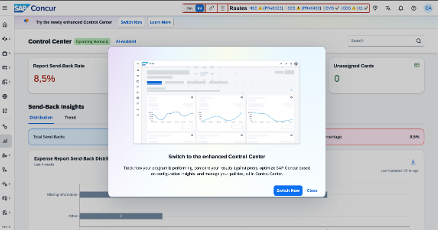
- To access the new Control Center features, admins must first enable the Spend Admin UI by selecting the banner at the top of the page and then enable the newly enhanced Control Center using the prompt at the top of that page.
- Admins who wish to participate in benchmarking should review the methodology panel available within each benchmark drill-down, which explains the data source, calculation method, and how each insight is intended to be used.
- Admins who prefer not to contribute to the anonymized benchmarking pool can opt out directly within the UI.
Full details on the new enhanced features are made available below. If you have questions about how these features apply to your specific program configuration or edition, reach out to your SAP Concur account team for tailored guidance.

