
- Home
- :
- Product Forums
- :
- Concur Expense Forum
- :
- Re: Validation Import (OID) in DELTA
This content from the SAP Concur Community was machine translated for your convenience. SAP does not provide any guarantee regarding the correctness or completeness of this machine translated text. View original text custom.banner_survey_translated_text

- Mute
- Subscribe
- Bookmark
- Report Inappropriate Content
Validation Import (OID) in DELTA
Hi Anyone,
I would like to change the Definition to "CT_VALIDATION_RULE_DATA_DELTA", by the purpose to update one of all TYPE, by schedule SFTP import. In the first column is "ACTION_TYPE".
Do anyone know how the possible values for this field?
For the action:
New
Modify
Remove
Thank you,
Arthasit S.
Solved! Go to Solution.
This content from the SAP Concur Community was machine translated for your convenience. SAP does not provide any guarantee regarding the correctness or completeness of this machine translated text. View original text custom.banner_survey_translated_text


- Mute
- Subscribe
- Bookmark
- Report Inappropriate Content
@asurarangsan Thanks for providing the screenshot. Here is the value list for column 1 - Action Type.
'"I" - Insert the record
"U" - Update an existing record (record selection is based off of the key fields
"P" - Insert / Update (Put): inserts if not existing otherwise updates existing row
"D" – Delete
Is this what you were looking for?
Remember to tag me if your respond or feel free to mark this post as Solved if you don't have further questions or comments. To tag me on your response, you click the Reply button, first thing to type is @. This should bring up the username of the person you are replying to.
Thank you,
Lee-Anne Dautovic
SAP Concur Community Moderator
Did this response answer your question? Be sure to select “Accept as Solution” so your fellow community members can be helped by it as well.
This content from the SAP Concur Community was machine translated for your convenience. SAP does not provide any guarantee regarding the correctness or completeness of this machine translated text. View original text custom.banner_survey_translated_text


- Mute
- Subscribe
- Bookmark
- Report Inappropriate Content
@asurarangsan can you provide a screenshot of where you are seeing this?
Thank you,
Kevin
SAP Concur Community Manager
Did this response answer your question? Be sure to select “Accept as Solution” so your fellow community members can be helped by it as well.

This content from the SAP Concur Community was machine translated for your convenience. SAP does not provide any guarantee regarding the correctness or completeness of this machine translated text. View original text custom.banner_survey_translated_text
- Mute
- Subscribe
- Bookmark
- Report Inappropriate Content
Hi Kevin,
Here is steps;
1. Go to Administration -> Company -> Toos -> Import/Extract Administrator
2, Select tab "Import" and choose "EXTERNAL_VALIDATION..." (OID). Then click Modify, and select "CT_VALIDATION_RULE_DATA_DELTA".
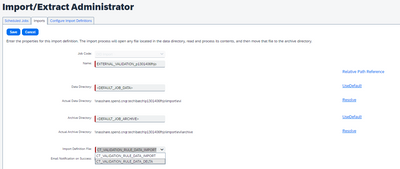
3. Save it
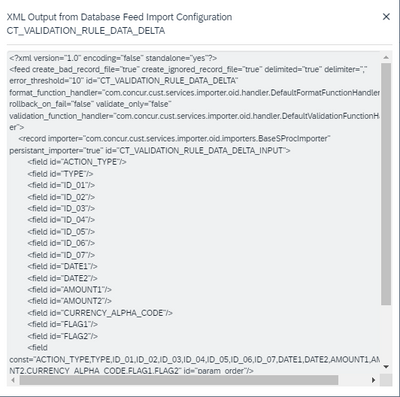
4. Click tab "Configure Import Definition" to see whether "CT_VALIDATION_RULE_DATA_DELTA" definition is.
5. here in XML. There is "ACTION_TYPE" prior "TYPE" .
Best regards,
This content from the SAP Concur Community was machine translated for your convenience. SAP does not provide any guarantee regarding the correctness or completeness of this machine translated text. View original text custom.banner_survey_translated_text
- Mute
- Subscribe
- Bookmark
- Report Inappropriate Content
@asurarangsan Thanks for providing the screenshot. Here is the value list for column 1 - Action Type.
'"I" - Insert the record
"U" - Update an existing record (record selection is based off of the key fields
"P" - Insert / Update (Put): inserts if not existing otherwise updates existing row
"D" – Delete
Is this what you were looking for?
Remember to tag me if your respond or feel free to mark this post as Solved if you don't have further questions or comments. To tag me on your response, you click the Reply button, first thing to type is @. This should bring up the username of the person you are replying to.
Thank you,
Lee-Anne Dautovic
SAP Concur Community Moderator
Did this response answer your question? Be sure to select “Accept as Solution” so your fellow community members can be helped by it as well.
This content from the SAP Concur Community was machine translated for your convenience. SAP does not provide any guarantee regarding the correctness or completeness of this machine translated text. View original text custom.banner_survey_translated_text
- Mute
- Subscribe
- Bookmark
- Report Inappropriate Content
This content from the SAP Concur Community was machine translated for your convenience. SAP does not provide any guarantee regarding the correctness or completeness of this machine translated text. View original text custom.banner_survey_translated_text

- Mute
- Subscribe
- Bookmark
- Report Inappropriate Content
Hi Arthasit,
How were you able to setup this import job to be SFTP?
This content from the SAP Concur Community was machine translated for your convenience. SAP does not provide any guarantee regarding the correctness or completeness of this machine translated text. View original text custom.banner_survey_translated_text
- Mute
- Subscribe
- Bookmark
- Report Inappropriate Content
Make sure to put EVI_ at front of filename
Step 1: Creating the Import Data File
The client assembles the import data file, formatting it according to the specifications in this document. The import data file specifications are as follow:
Format Type: Delimiter-Separated Value, UTF8
Supported Field Delimiter: Comma
Enclosing Character: Double Quote
Record Delimiter: CRLF
File Naming Conventions
The data file name should be of the format "EVI_entitycode_yyyymmdd.txt.pgp". If an entity has the code t0000123abcd, then the file name for the import data file would be "EVI_t0000123abcd_yyyymmdd.txt.pgp".
List Item Imports
When validation rules compare list items in Expense with values in the validation table, they use the list item code, not the list item value. The data imported to the validation table must contain the list item code for the validation to work properly.
