
- Home
- :
- Product Forums
- :
- Concur Expense Forum
- :
- Manager added me as delegate, but option to act as...
This content from the SAP Concur Community was machine translated for your convenience. SAP does not provide any guarantee regarding the correctness or completeness of this machine translated text. View original text custom.banner_survey_translated_text

- Mute
- Subscribe
- Bookmark
- Report Inappropriate Content
Manager added me as delegate, but option to act as other user not there
My manager added me as an expense delegate. I got an email with a few expenses listed. However, when I login to Concur, there is no option to act as the other user. Help!
This content from the SAP Concur Community was machine translated for your convenience. SAP does not provide any guarantee regarding the correctness or completeness of this machine translated text. View original text custom.banner_survey_translated_text


- Mute
- Subscribe
- Bookmark
- Report Inappropriate Content
@jmontxerox to act as another user, you need to click Profile hear the upper right corner. You should see the following:
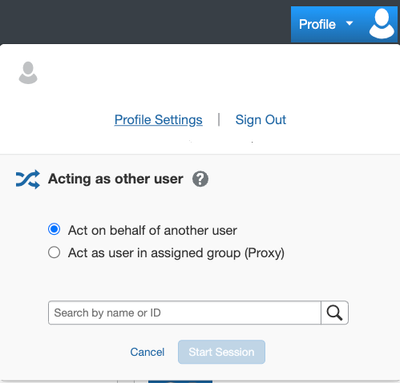
Type in the name of the person for whom you are the delegate.
Is this what you tried?
Thank you,
Kevin
SAP Concur Community Manager
Did this response answer your question? Be sure to select “Accept as Solution” so your fellow community members can be helped by it as well.

This content from the SAP Concur Community was machine translated for your convenience. SAP does not provide any guarantee regarding the correctness or completeness of this machine translated text. View original text custom.banner_survey_translated_text
- Mute
- Subscribe
- Bookmark
- Report Inappropriate Content
Yes, but that option is not there - just my name, with a link to profile settings.
This content from the SAP Concur Community was machine translated for your convenience. SAP does not provide any guarantee regarding the correctness or completeness of this machine translated text. View original text custom.banner_survey_translated_text
- Mute
- Subscribe
- Bookmark
- Report Inappropriate Content
I am having this same issue.
This content from the SAP Concur Community was machine translated for your convenience. SAP does not provide any guarantee regarding the correctness or completeness of this machine translated text. View original text custom.banner_survey_translated_text

- Mute
- Subscribe
- Bookmark
- Report Inappropriate Content
@KevinD - I am experiencing this same issue after implementation. If you have any recommendations after adding the Delegate but the delegate not seeing the "Act As" option on their profile icon I would appreciate any recommendations!
Thank you,
This content from the SAP Concur Community was machine translated for your convenience. SAP does not provide any guarantee regarding the correctness or completeness of this machine translated text. View original text custom.banner_survey_translated_text
- Mute
- Subscribe
- Bookmark
- Report Inappropriate Content
@Taylor_CC2026 I thought you were referring to yourself in this instance, but after looking at your profile and seeing no delegates, I'm guessing you are posting on someone else's behalf. Can you send me a private message with the names of the two people involve, please? Click my username (KevinD) then the Message button to private message me.
Thank you,
Kevin
SAP Concur Community Manager
Did this response answer your question? Be sure to select “Accept as Solution” so your fellow community members can be helped by it as well.
