
- Home
- :
- Resources
- :
- Admin Resources
- :
- What’s New in Product
- :
- Introducing QR Code Sign-In : Seamless Mobile Acce...
This content from the SAP Concur Community was machine translated for your convenience. SAP does not provide any guarantee regarding the correctness or completeness of this machine translated text. View original text custom.banner_survey_translated_text
Introducing QR Code Sign-In : Seamless Mobile Access for SAP Concur
- Subscribe
- Bookmark
- Report Inappropriate Content

 KC Nikhil Kumar
OVERVIEW
If your employees are already signed in to SAP Concur on the web and then need to continue working on their phone - submitting expenses at the airport, approving a request from a hotel lobby - being asked to re-enter credentials is a real barrier. That friction slows adoption and breaks continuity at exactly the moments mobile matters most. QR Code Sign-In eliminates that barrier entirely by letting authenticated web users scan a code and move straight into the mobile app. This is a meaningful step forward in how SAP Concur supports the modern, mobile-first workforce.
WHAT'S CHANGING
- A QR code is now displayed on the SAP Concur web mobile registration page, allowing any user who is already authenticated on the web to scan the code with the SAP Concur mobile app and complete sign-in without re-entering their credentials.
- A two-step verification flow protects the authentication process after scanning the QR code, a short verification code is displayed in the mobile app and must be entered on the web page to confirm the sign-in, preventing unauthorized access through a photographed or shared QR code.
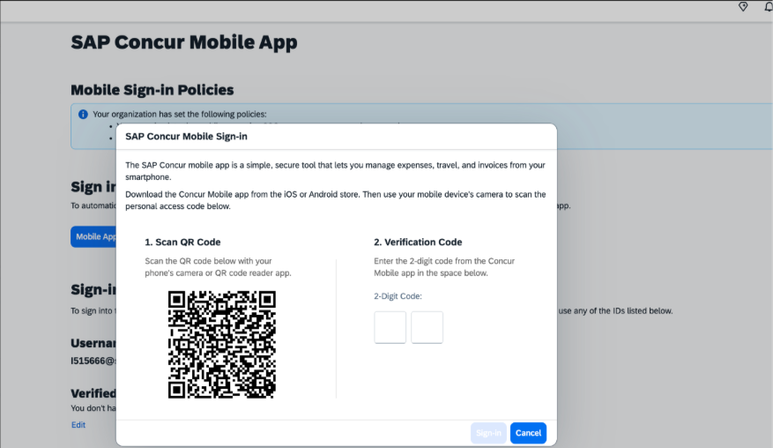
- QR Code Sign-In works across all supported login methods, including SSO, password, and MFA, and is compatible with both SAML v2 and legacy authentication models, subject to environment validation.
- Company administrators can disable QR Code Sign-In for their organization at any time using a policy toggle located in the SAP Concur admin settings (Path: Administration > Company admin > Authentication admin > Allow users to sign in to the SAP Concur mobile app using a QR code) and this toggle is made available starting 14th July 2026 before General Availability to allow organizations to opt out proactively if needed.
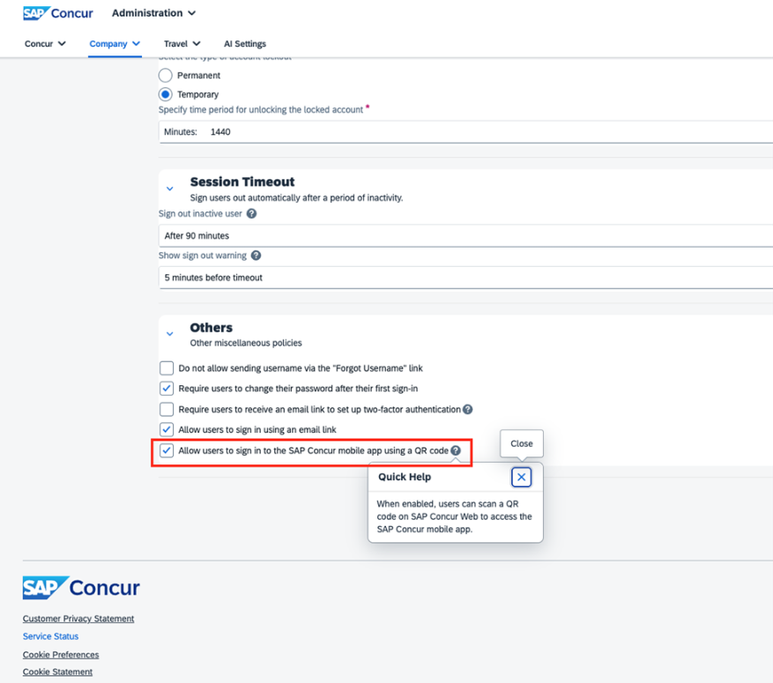
- QR Code Sign-In does not automatically authenticate users into Joule on the mobile app users will be prompted to enter their Joule credentials manually even after completing a successful QR code sign-in, and this is a known limitation at launch.
WHO IS AFFECTED
- QR Code Sign-In is available to all customers running either Standard or Professional editions of SAP Concur. Customers on CCPS environments are not included in this rollout and should await further communication on a separate CCPS-specific release.
- The feature is enabled by default at GA and requires no administrator action to activate. End users particularly those who regularly transition between the SAP Concur web application and mobile app, such as travelers and field-based employees will benefit most directly from the change.
- Company administrators are the key decision-makers for organizations that wish to disable the feature as needed.
TIMELINE
- The targeted General Availability date is July 28, 2026, for customers on US2, EU2, and APJ1 data centers.
- The admin policy toggle is made available starting 14th July 2026 before General Availability, giving organizations time to review settings and opt out if required before the feature goes live.
- Post-General Availability, end-user WalkMe guidance and in-app guided tools will be released.
ACTION REQUIRED
- For most customers, no action is required. QR Code Sign-In will be enabled by default at GA and end users simply need to ensure they have the latest version of the SAP Concur mobile app installed on their device.
- Administrators who do not wish to offer QR Code Sign-In to their organization should navigate to mobile sign-in settings in the SAP Concur admin console (Path: Administration > Company admin > Authentication admin > Allow users to sign in to the SAP Concur mobile app using a QR code) and this toggle is made available starting 14th July 2026 before GA to allow organizations to opt out proactively if needed.
Need Help? Refer to the resources below.
