
- Home
- :
- Product Forums
- :
- General
- :
- Re: Register Partner Application
This content from the SAP Concur Community was machine translated for your convenience. SAP does not provide any guarantee regarding the correctness or completeness of this machine translated text. View original text custom.banner_survey_translated_text

- Mute
- Subscribe
- Bookmark
- Report Inappropriate Content
Register Partner Application
We need to set up a new user in Concur with the necessary permissions to use data extractions to Celonis. The steps are mentioned below. But when I login to SAP Concur with my login I don’t see this option “Register Partner Application”. Can you please advise how to add/enable this option to my user.
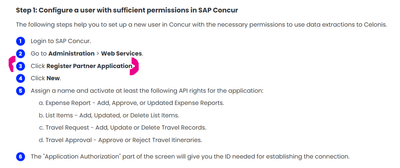
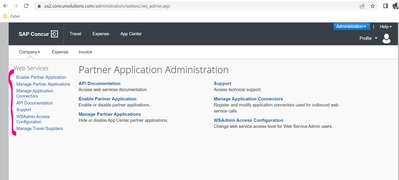
When i Login into Concur with my user – Not able to find this option “Register Partner Application”
Your input is highly appreciated.
thanks
This content from the SAP Concur Community was machine translated for your convenience. SAP does not provide any guarantee regarding the correctness or completeness of this machine translated text. View original text custom.banner_survey_translated_text


- Mute
- Subscribe
- Bookmark
- Report Inappropriate Content
@rameshsathyamo did you try the Manage Application Connectors option?
The steps you have may have changed slightly.
Thank you,
Kevin
SAP Concur Community Manager
Did this response answer your question? Be sure to select “Accept as Solution” so your fellow community members can be helped by it as well.

This content from the SAP Concur Community was machine translated for your convenience. SAP does not provide any guarantee regarding the correctness or completeness of this machine translated text. View original text custom.banner_survey_translated_text

- Mute
- Subscribe
- Bookmark
- Report Inappropriate Content
Please let us know if there was any progress on this item.
We have been struggling to enable the connection to Celonis, and some help would be highly appreciated.
Thanks in advance and kind regards,
Camilo.
IT-GFS Purchasing – Principal System Analyst
Boehringer Ingelheim España, S.A.
This content from the SAP Concur Community was machine translated for your convenience. SAP does not provide any guarantee regarding the correctness or completeness of this machine translated text. View original text custom.banner_survey_translated_text
- Mute
- Subscribe
- Bookmark
- Report Inappropriate Content
I see Ramesh's post is very old, but I leave this in case it is useful for someone in the future.
Celonis standard Concur connection is either outdated and not working or very little user friendly. I have finally made it work using JWT authentication.
This document just describes how I made it work. It isn't a suggestion on how to do it nor represents the best way to do it.
before starting you need to have created a JWT as described here:
Guide to Web Services Authentication.pdf
you need to have already issued a refresh token (I use Postman) for the solution to work.

Once you have issued the refresh token, you will have everything necessary for a custom authentication on Celonis.
On Celonis select Data --> Data Integration.
At this stage I assume a concur pool has already been created (I'm no Celonis expert so I will not comment on that).
Once you select Concur Pool, click on "Add Data Connection" button --> Connect to Data Source --> Create Custom REST API extractor.
Give Name, Description and click on Create
this will open a set of 4 items which I will cover in order:
1. Variables
Define the following variables

Make sure Client ID, Client Secret and Refresh token are marked as confidential.
Save.
2. Custom authentication.


This will enable your data connection. It is not easy to know if it has been connected, but you can use the Data connection for it.
3. Data connection,
Select an existing endpoint for testing and click on "Test Connection" you will see a green check mark.


Hope this has helped.
IT-GFS Purchasing – Principal System Analyst
Boehringer Ingelheim España, S.A.
