
- Home
- :
- Product Forums
- :
- Concur Travel Forum
- :
- Flight Search/Selection Error (FOPF-00012) – Occur...
This content from the SAP Concur Community was machine translated for your convenience. SAP does not provide any guarantee regarding the correctness or completeness of this machine translated text. View original text custom.banner_survey_translated_text

- Mute
- Subscribe
- Bookmark
- Report Inappropriate Content
Flight Search/Selection Error (FOPF-00012) – Occurring on Desktop & Mobile for All Routes/Dates
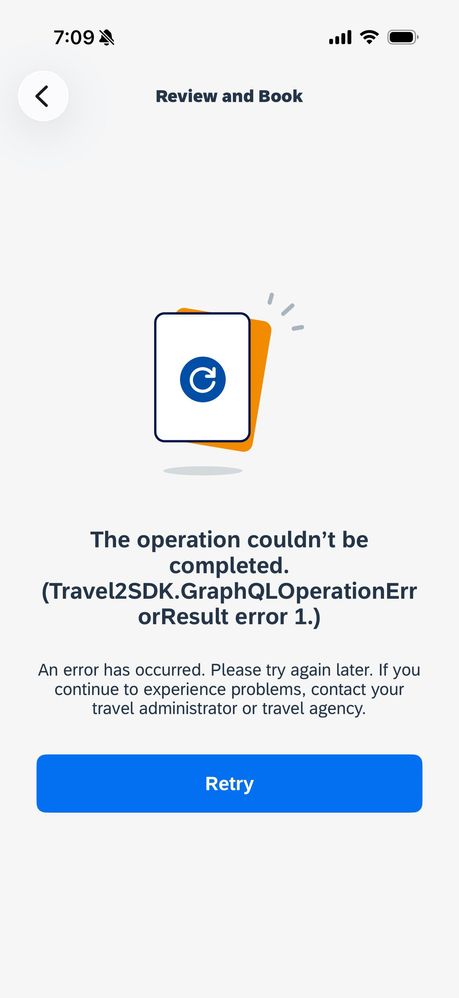
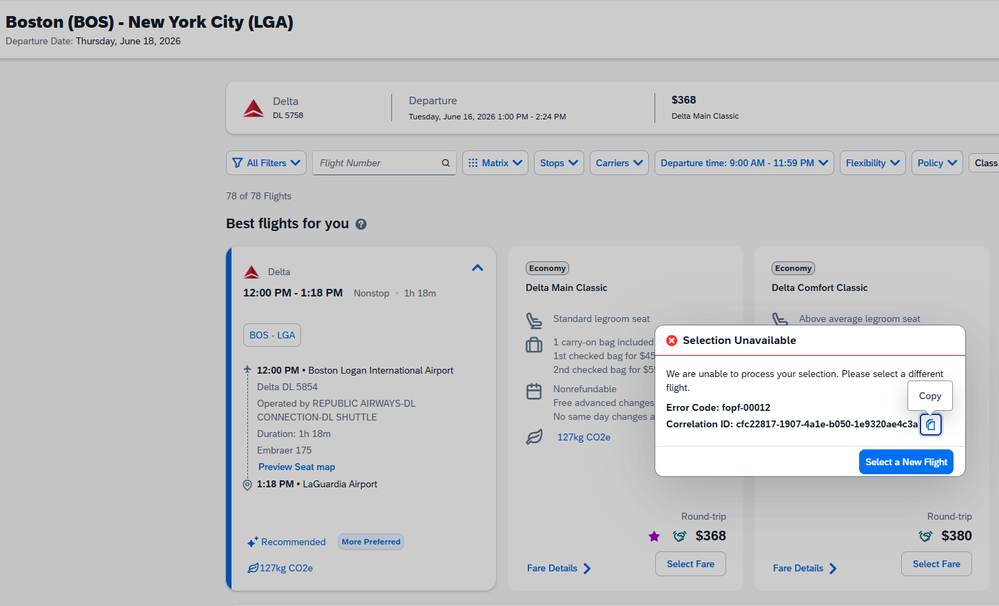
I am experiencing a persistent flight selection error in SAP Concur Travel with error code FOPF-00012, which is preventing any booking from being completed.
Issue Details:
- I have made several successful bookings in the past without issue. Problem began 4-5 days ago.
- Error occurs during flight selection (after search results load)
- Happens for all origins and destinations, for example:
- JFK → MSP
- EWR → MIA
- LGA → BOS
- Occurs with both:
- One-way bookings
- Round-trip bookings
- Happens across all date ranges tested:
- 1 day out
- 60+ days out
Scope / Impact:
- Affects both desktop and mobile versions of Concur
- Issue has been ongoing for 5 days
- Preventing self-service travel booking and causing:
- Reliance on agency phone bookings
- Increased cost and inefficiency
Troubleshooting Completed:
- Deleted and re-added payment method → No improvement
- Verified issue is not card-related:
- Travel agency successfully booked on behalf of user using the same credit card
- Booking populated correctly in Concur after ticketing
Key Observation:
- Since a live agent can complete bookings using the same profile and payment method, this appears to be a Concur system issue (likely profile, policy, or booking engine related) rather than a payment failure.
Request:
- Has anyone encountered error FOPF-00012 before?
- Are there known causes (e.g., profile corruption, travel policy configuration, GDS sync issues)?
- What steps are recommended to resolve quickly?
This is becoming urgent as it is impacting upcoming business travel.
This content from the SAP Concur Community was machine translated for your convenience. SAP does not provide any guarantee regarding the correctness or completeness of this machine translated text. View original text custom.banner_survey_translated_text


- Mute
- Subscribe
- Bookmark
- Report Inappropriate Content
Hello @jhczv .
On the Concur support website, I found article 000075818 that discusses the FOPF-00012 error. It indicates that the issue may be related to the assigned Corporate Ghost Card, either because, the Corporate Ghost Card assigned to the user has expired, or the user does not have any card assigned for booking purposes
I’m attaching the article details and the link for your reference:
Article Number | 000075818 | |
Title | Error: "No valid forms of payment found. Please contact your Travel Administrator" | |
Details |
| |
Resolution/Answer |
| |
Cause |
| |
Additional Information | ||
Attachment |

✔️Hope this helps! Let me know if you have any questions✔️
Best Regards,
CJ
✔️Hope this helps! Let me know if you have any questions✔️
Best Regards,
CJ
This content from the SAP Concur Community was machine translated for your convenience. SAP does not provide any guarantee regarding the correctness or completeness of this machine translated text. View original text custom.banner_survey_translated_text
- Mute
- Subscribe
- Bookmark
- Report Inappropriate Content
Thanks, I saw that article as well. I even deleted my corp card and uploaded a valid personal card into saved payment method, and the same error occurs.
I don't believe my account has a corp ghost card - I have an issued corporate card to my name.
This content from the SAP Concur Community was machine translated for your convenience. SAP does not provide any guarantee regarding the correctness or completeness of this machine translated text. View original text custom.banner_survey_translated_text
- Mute
- Subscribe
- Bookmark
- Report Inappropriate Content
Hi @jhczv ,
In my company we use a corporate ghost card for Travel, so employees don’t have to use their corporate card. When you request a trip, do you enter your corporate card?
On the other hand, if you have access to Concur support, open a case. If not, contact your company’s Concur administrator so they can open one and review what’s happening to you.
✔️Hope this helps! Let me know if you have any questions✔️
Best Regards,
CJ
This content from the SAP Concur Community was machine translated for your convenience. SAP does not provide any guarantee regarding the correctness or completeness of this machine translated text. View original text custom.banner_survey_translated_text


- Mute
- Subscribe
- Bookmark
- Report Inappropriate Content
@jhczv ghost cards aren't associated to any one individual, but they are applied to the entire company. Some companies set the ghost card as the default payment for Air bookings. So, if there is an issue with the ghost card, the booking couldn't be completed. This isn't something you could fix yourself. The team who manages company cards is likely the team to contact.
Thank you,
Kevin
SAP Concur Community Manager
Did this response answer your question? Be sure to select “Accept as Solution” so your fellow community members can be helped by it as well.

This content from the SAP Concur Community was machine translated for your convenience. SAP does not provide any guarantee regarding the correctness or completeness of this machine translated text. View original text custom.banner_survey_translated_text


- Mute
- Subscribe
- Bookmark
- Report Inappropriate Content
Based on everything you've described, this doesn't look like a traveler-side payment issue. The fact that your travel agency can successfully ticket the exact same itinerary using your profile and that the reservation syncs back into Concur strongly suggests the problem is occurring during Concur's booking validation rather than at ticketing.
A few additional things I'd ask your company's Concur administrator to verify:
Confirm your travel profile is correctly associated with the active travel configuration (travel policy, agency/GDS, and booking permissions).
Check whether your company requires a Corporate Ghost Card for air bookings, even if you have a valid corporate card assigned. A traveler's saved payment card often isn't the payment source Concur actually uses for airline bookings.
Review the booking logs using the Correlation ID from the error. The backend logs usually identify whether the failure is related to the form of payment, policy validation, GDS synchronization, or another booking rule.
Verify that your employee profile hasn't become corrupted or duplicated in the travel system, especially if the issue started suddenly after previously working without changes.
If no configuration issues are found, ask SAP Concur Support to investigate the error using the Correlation ID and confirm whether there is a backend booking engine or GDS issue affecting your account.
Since the problem occurs on both desktop and mobile, across every route, airline, and date tested, it's very unlikely to be a browser, cache, or itinerary-specific issue. At this point, the fastest path to resolution is having your Concur administrator open a support case with SAP Concur and include one or more Correlation IDs from failed booking attempts so the engineering team can trace the transaction in the backend logs.
