
- Home
- :
- Product Forums
- :
- Concur Expense Forum
- :
- List Settings in Expense Processor screen
This content from the SAP Concur Community was machine translated for your convenience. SAP does not provide any guarantee regarding the correctness or completeness of this machine translated text. View original text custom.banner_survey_translated_text

- Mute
- Subscribe
- Bookmark
- Report Inappropriate Content
List Settings in Expense Processor screen
Hello!
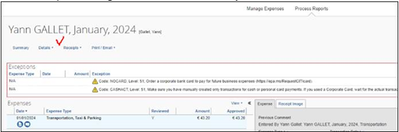
Can you please advise why some of our colleagues have 'List Settings' button in Expense Reports of Expense Processor screen, while some of them don't?
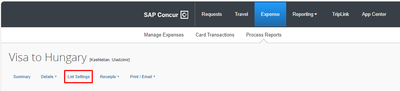
First one is my screenshot, and the second one if from my colleagues:
Solved! Go to Solution.
- Labels:
-
Setup & Configuration
-
Troubleshooting
This content from the SAP Concur Community was machine translated for your convenience. SAP does not provide any guarantee regarding the correctness or completeness of this machine translated text. View original text custom.banner_survey_translated_text
- Mute
- Subscribe
- Bookmark
- Report Inappropriate Content
This is being resolved by accurate reading of Documantetion 🙂
Just needed to change the view to be custom:

This content from the SAP Concur Community was machine translated for your convenience. SAP does not provide any guarantee regarding the correctness or completeness of this machine translated text. View original text custom.banner_survey_translated_text
- Mute
- Subscribe
- Bookmark
- Report Inappropriate Content
This is being resolved by accurate reading of Documantetion 🙂
Just needed to change the view to be custom:
This content from the SAP Concur Community was machine translated for your convenience. SAP does not provide any guarantee regarding the correctness or completeness of this machine translated text. View original text custom.banner_survey_translated_text

- Mute
- Subscribe
- Bookmark
- Report Inappropriate Content
Hi,
The Approvers would like to have the same screen as the Processors, that is to include in their main screen for example the Business purpose or custom fields which are available in the List Settings. Is there a way to do it?
Appreciate your help
Adelina
This content from the SAP Concur Community was machine translated for your convenience. SAP does not provide any guarantee regarding the correctness or completeness of this machine translated text. View original text custom.banner_survey_translated_text


- Mute
- Subscribe
- Bookmark
- Report Inappropriate Content
@ACamama the Processor main screen layout isn't available for Approvers. However, once an approver opens a report their view can be the same as what fields the Processor sees. However, it is also possible to hide fields from Approvers and make them visible to Processors.
What you can do is have the fields you mentioned be Read-Only for Approvers. My guess is if approvers aren't seeing these fields when reviewing reports, someone set them to Hidden for approvers. You should submit a Help ticket to Concur Support to have this done. This takes access to Forms and Fields, which unless you or someone at your company has taken our advanced configuration class, you won't have access to.
Thank you,
Kevin
SAP Concur Community Manager
Did this response answer your question? Be sure to select “Accept as Solution” so your fellow community members can be helped by it as well.

This content from the SAP Concur Community was machine translated for your convenience. SAP does not provide any guarantee regarding the correctness or completeness of this machine translated text. View original text custom.banner_survey_translated_text
- Mute
- Subscribe
- Bookmark
- Report Inappropriate Content
Hi Kevin,
Is there a difference in the Approver main screen layout between Standard & Professional version? Can you do more customization in the Professional version?
Thank you
