
- Home
- :
- Product Forums
- :
- Concur Expense Forum
- :
- Re: Hotel expense itemization error
This content from the SAP Concur Community was machine translated for your convenience. SAP does not provide any guarantee regarding the correctness or completeness of this machine translated text. View original text custom.banner_survey_translated_text

- Mute
- Subscribe
- Bookmark
- Report Inappropriate Content
Hotel expense itemization error
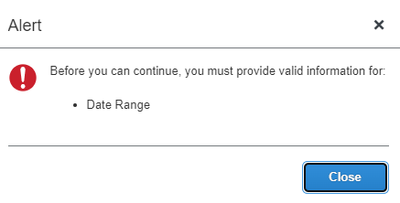
When I try to itemize my expense and save it, I receive this error: Before you can continue, you must provide valid information for: Date Range. The dates in Details page are correct, as in the receipt.
Solved! Go to Solution.
This content from the SAP Concur Community was machine translated for your convenience. SAP does not provide any guarantee regarding the correctness or completeness of this machine translated text. View original text custom.banner_survey_translated_text


- Mute
- Subscribe
- Bookmark
- Report Inappropriate Content
What we see that the issue is happening when we use the "Recurring Itemization" . So we suggested to go with the Single itemization by updating the Check-in Date in the date field and save the entry. Once done, then select the entry and copy the same until the total Itemized about is set to Zero. So with this there will be entry created for each day between the Check-in & Check-out date.
This content from the SAP Concur Community was machine translated for your convenience. SAP does not provide any guarantee regarding the correctness or completeness of this machine translated text. View original text custom.banner_survey_translated_text


- Mute
- Subscribe
- Bookmark
- Report Inappropriate Content
Hello all. If you are having the itemization issue, please read through this thread and see the workaround @jyotesh519 posted. When itemizing the room rate, do them as a single itemization, not a recurring. You can always enter one room rate, then select that itemization and use the copy feature. You can adjust the amounts as needed. See screenshot.
Nice catch @jyotesh519

Thank you,
Kevin
SAP Concur Community Manager
Did this response answer your question? Be sure to select “Accept as Solution” so your fellow community members can be helped by it as well.

This content from the SAP Concur Community was machine translated for your convenience. SAP does not provide any guarantee regarding the correctness or completeness of this machine translated text. View original text custom.banner_survey_translated_text
- Mute
- Subscribe
- Bookmark
- Report Inappropriate Content
That 'workaround' is NOT working! No matter how I manipulate my checkin and checkout dates I still see 0 for number of nights on the itemization screen and the system will not allow me to save the itemization regardless of whether single or recurring! How long until we get an actual fix for this error?
This content from the SAP Concur Community was machine translated for your convenience. SAP does not provide any guarantee regarding the correctness or completeness of this machine translated text. View original text custom.banner_survey_translated_text
- Mute
- Subscribe
- Bookmark
- Report Inappropriate Content
@MJH1 I went into your account to look at your hotel expense, but I see you submitted the report. I noticed you entered all Hotel Tax on your itemizations. I was going to try the workaround suggested. I tried it for someone else yesterday and it worked with no issue so I wanted to try it on your report.
I guess we'll see if your report gets approved. 🙂
As for the fix, I haven't heard of a timeline. I just know our R&D team is working on it.
Thank you,
Kevin
SAP Concur Community Manager
Did this response answer your question? Be sure to select “Accept as Solution” so your fellow community members can be helped by it as well.
This content from the SAP Concur Community was machine translated for your convenience. SAP does not provide any guarantee regarding the correctness or completeness of this machine translated text. View original text custom.banner_survey_translated_text

- Mute
- Subscribe
- Bookmark
- Report Inappropriate Content
hi all,
I know this thread is old, but I am facing the same error and the workaround does not work for me. I can not even access the itemsations-page - everytime I click it, I can catch a glimpse of the imesation-page before it immediately jumps back to the details-page and popping up the errormessagen "before you can continue, you must provide valid information for: - date range"
any ideas?
This content from the SAP Concur Community was machine translated for your convenience. SAP does not provide any guarantee regarding the correctness or completeness of this machine translated text. View original text custom.banner_survey_translated_text

- Mute
- Subscribe
- Bookmark
- Report Inappropriate Content
I am having the same issue. Concur support doesnt seem to see it on their end.
This content from the SAP Concur Community was machine translated for your convenience. SAP does not provide any guarantee regarding the correctness or completeness of this machine translated text. View original text custom.banner_survey_translated_text
- Mute
- Subscribe
- Bookmark
- Report Inappropriate Content
I have several associates that are encountering this error about the date range. If you need examples, please reach out to me and I can provide you some. Any information you can provide to get this resolved would be greatly appreciated. Thank you
This content from the SAP Concur Community was machine translated for your convenience. SAP does not provide any guarantee regarding the correctness or completeness of this machine translated text. View original text custom.banner_survey_translated_text

- Mute
- Subscribe
- Bookmark
- Report Inappropriate Content
I've also had several associates encounter this issue in the last several weeks. The most recent was only able to itemize her hotel expense using Hotel Tax. When she tried to add Hotel as an itemized line, this error popped up: "Before you can continue, you must provide valid information for: Date Range"
Rather than using workarounds, fixing this know error would be ideal considering this has been going on since 2022.
This content from the SAP Concur Community was machine translated for your convenience. SAP does not provide any guarantee regarding the correctness or completeness of this machine translated text. View original text custom.banner_survey_translated_text
- Mute
- Subscribe
- Bookmark
- Report Inappropriate Content
Today I had no problems. keeping my fingers crossed!
learning from last week:
As mentioned in my first message, the here described workaround did not work for me. Everytime I've tried to access the itemizations-tab the screens immediately jumped back to the previous screen. What helped here for no reason was to leave the field "business purpose" empty/delete potential description. Then I could finally access the itemizations-tab, make my adjustments and fill out the business purpose at the very end.
